How an independent insurance agency website turns quote requests into bound policies
Agencies bind more policies when each line of business has its own short quote form, a person replies the same day, and every line has a page that answers the buyer.
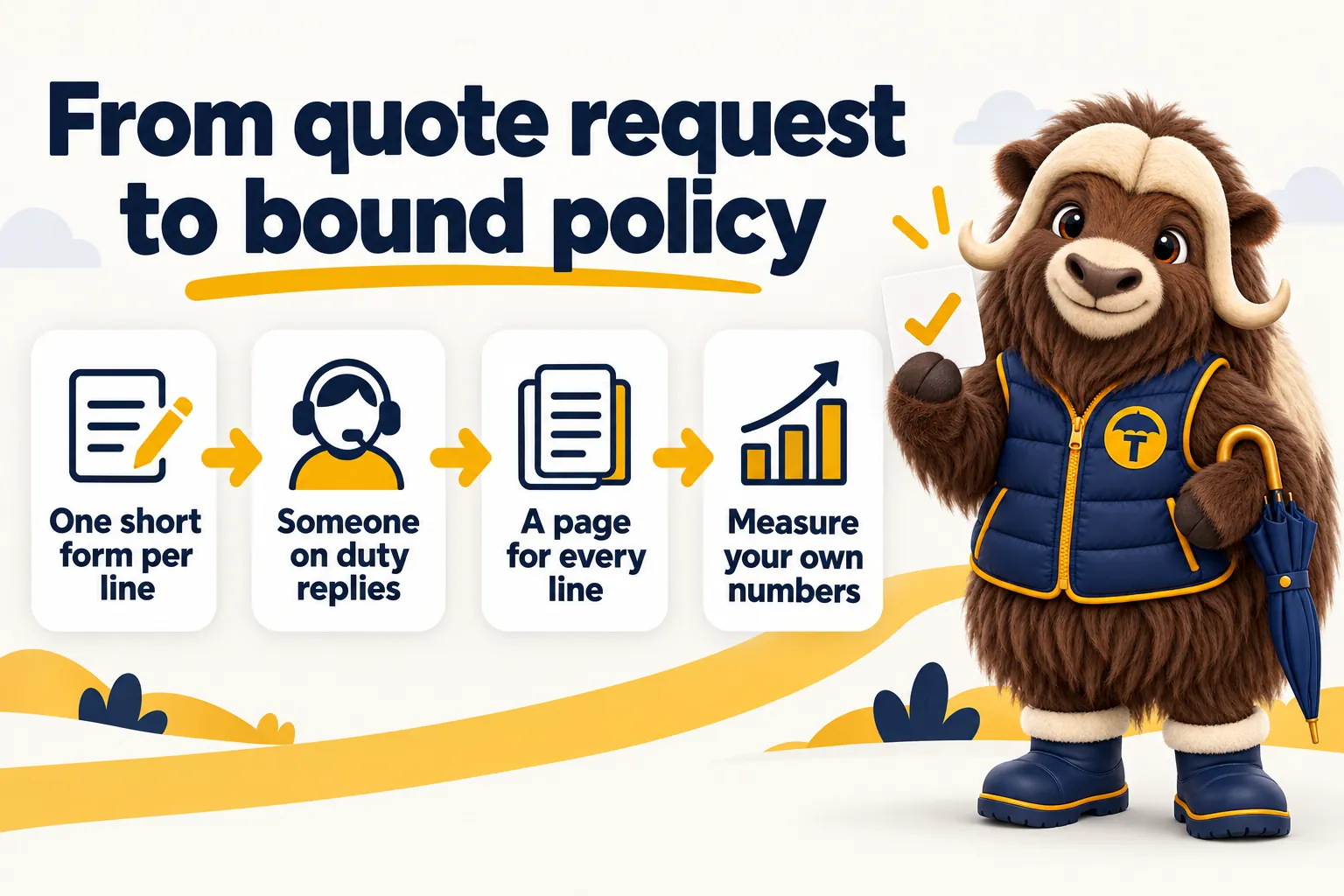
An independent insurance agency website turns quote requests into bound policies by doing three plain things well: it gives each line of business a short form that asks only what a producer needs to start a quote, it gets that request in front of a person who replies the same day, and it carries a page for every line and every appointed carrier so the buyer arrives at the form already knowing the agency can help. Everything else on the site, from the design to the blog, exists to feed that path.
This article is general information about websites for insurance agencies. GetInsuranceWebsite is a website design and management company. We are not an insurance agency, broker, carrier or licensed producer, and nothing here is advice about coverage, rates or eligibility. The decisions about what to quote and how to bind stay with your licensed staff and your carriers.
Why the quote form is the whole website
The quote form is where the website stops being a brochure and starts doing the agency’s work. A visitor who reads the home page and leaves has cost you nothing and earned you nothing. A visitor who fills in a form has handed the agency a name, a line of business and permission to call. Every design decision on the site should be judged by whether it makes that moment more likely and the request that lands more useful to the producer who picks it up.
That is why the form deserves more thought than the hero image. Most agency websites treat the quote request as an afterthought, a single “Get a quote” button that opens a generic contact form with a free-text box. The producer then has to call back just to learn what the person wanted. A site built around the request does the opposite. It asks the buyer to choose a line first, shows a form written for that line, and routes the answer to the person who will actually quote it.
The site is where quotes start, not where they finish
A marketing website is not a rating engine and should not pretend to be one. Comparative raters, carrier portals and the agency management system do the quoting and the binding. The website’s job is narrower and more important: bring the right buyer to the right form, collect enough to open the file, and make the hand-off to a person immediate. When the site tries to do more, by asking for every rating detail up front or by promising an instant premium it cannot deliver, it loses the request before a producer ever sees it.
Quote form design: ask only what starts the quote
The best quote form asks for exactly what a producer needs to open a quote with a carrier and nothing more. That is a shorter list than most agencies think. For most personal lines it is a name, a phone or email, an address, and one or two facts that identify the risk. For most commercial lines it is the business name, the contact, the nature of the business, and roughly what they want covered. Everything else can wait for the conversation.
One form per line of business
A single universal form cannot be short, because the facts that start a homeowners quote have nothing to do with the facts that start a general liability quote. Splitting the form by line solves that. Each form can be written in the buyer’s own words, each can ask the two or three questions that matter for that line, and each can carry a hidden field that tells the agency management system which line the request belongs to. A visitor looking for commercial auto never sees a question about the year their roof was replaced.
This also fixes routing. When the line is known at submission, the request can go straight to the personal lines desk, the commercial producer or the benefits team, without someone reading a free-text box and forwarding an email. The pages we build for personal lines agencies and commercial lines agencies each carry their own set of forms for exactly this reason.
What to ask, by line
The table below is a starting point. Your carriers and your own quoting process will move a few items between the columns, and that is fine. The principle is what matters: the left column opens the file, the right column is collected by a person after the first reply.
| Line of business | Ask on the website form | Leave for the producer |
|---|---|---|
| Personal auto | Name, phone or email, ZIP code, number of vehicles, number of drivers, current carrier if any | Driver license numbers, full VINs, violation history, prior claims, garaging details |
| Homeowners | Name, contact, property address, own or rent, approximate year built, current carrier if any | Replacement cost details, roof age and material, claims history, mortgagee clause, protective devices |
| Renters | Name, contact, rental address, move-in date | Contents inventory, scheduled items, prior claims |
| Umbrella | Name, contact, which underlying policies they hold and with whom | Underlying limits, household drivers, watercraft or rental property details |
| General liability | Business name, contact, what the business does, city or state, when coverage is needed | Payroll, receipts, subcontractor use, prior losses, certificate holders |
| Commercial auto | Business name, contact, number of vehicles, what they are used for | Vehicle schedule, driver list, radius of operation, MVRs |
| Workers compensation | Business name, contact, state, approximate number of employees, what the business does | Class codes, payroll by class, experience mod, prior carrier and losses |
| Business owners policy | Business name, contact, what the business does, premises address, own or lease | Building values, contents values, revenue, prior losses |
| Life | Name, contact, approximate age, reason for the inquiry in a short menu | Health history, medications, beneficiary details, face amount decisions |
| Health and benefits | Name or business name, contact, individual or group, number of employees if group | Census, current plan documents, renewal date, contribution strategy |
Notice that the left column is short for every line. That is deliberate. Anyone can complete it from memory, on a phone, in a minute or two. The right column contains things people have to look up, would rather say to a person, or should never type into a public website at all.
Why a long form loses the request
A long form loses the request because the person filling it in is not yet committed to the agency. They are comparing, often on a phone, often with two other tabs open. Every extra field is a reason to stop and try the next agency instead. Fields that ask for details they do not have to hand, such as a VIN or a policy number, do not just slow them down; they end the attempt, because the alternative is going to find the document and coming back later, and later rarely arrives.
Where the form sits on the page
The form, or the button that opens it, belongs where the buyer’s decision is made: at the top of every line page, again after the section that answers their main question, and in the header on every page of the site. It should not live only on a separate “Get a quote” page reached through the menu. Every time the buyer has to go looking for it, some of them do not.
Mobile is the default, not the exception
Most people who search for an insurance agency from a phone will also try to request the quote from the phone. The form has to work there first. That means one column, large touch targets, the right keyboard for each field (numeric for ZIP codes and phone numbers, email for email), no fields that require typing a long code from a document, and a submit button that is visible without scrolling once the fields are filled. It also means the page itself loads fast. A form that appears after a slow page has already lost the people who gave up while waiting. The Core Web Vitals guidance from web.dev is a good reference for what fast means in practice, and it is one of the reasons we build every site to a 90+ PageSpeed target.
Response time: the request is only worth what you do next
A quote request loses value from the moment it arrives, because the person who sent it is still shopping. The agency that replies first with a real message from a real person usually gets to quote. This is not a technology problem. Notifications can be sent anywhere in seconds. It is a staffing and process problem, and the website should be built around the process the agency actually runs.
Decide who is on duty
Before wiring a single notification, decide who answers website requests during business hours, who covers lunch, and what happens to a request that arrives at nine on a Friday night. The answer can be simple. One person owns it during the day, and after-hours requests get an automatic acknowledgment and a first human reply the next morning. What does not work is an inbox that everyone can see and nobody owns.
Push the request into the AMS or CRM, not an inbox
Every quote form on the site should push its submission straight into the agency management system or CRM as a new lead, with the line of business, the source page and the submitted answers already filled in. Email copies are fine as a backup, but the system of record is where the producer should find it, because that is where the follow-up will be logged. Every plan we offer pushes form submissions into the agency’s own system by API, Zapier or Make; the features page lists what that includes.
The notification itself should go to the person on duty by whatever channel they actually watch. For most agencies that is a text message or a mobile alert from the CRM, not another email. If the duty producer is on the phone, the alert should be visible the moment they hang up.
The first reply
The first reply does not need to contain a quote. It needs to prove that a person read the request. A good first reply names the producer, repeats back the line and the one or two facts the buyer gave, tells them what happens next, and asks for exactly one thing, usually the document or detail from the right-hand column of the table above that most unblocks the quote. It should also give them a way to reply that fits how they contacted you. If they wrote at midnight from a phone, a text or a short email is more welcome than a voicemail.
Follow-up cadence in plain words
Follow up until you have either a quote in front of them or a clear no. A sensible pattern is a same-day acknowledgment, a proper conversation as soon as they are available, a follow-up when the quote is ready, and a check-in if you have not heard back after a few days. Set the pattern as a task sequence in the CRM so it happens without anyone remembering it. Do not invent a cadence from a sales article; use the one that fits your lines, your staff and the pace your buyers expect, then adjust it once you have counted the results.
Carrier and line-of-business pages: how buyers find the form
Line and carrier pages are what bring the buyer to the quote form in the first place. Somebody searching for a specific kind of coverage in a specific town is not looking for an agency home page. They are looking for a page that says, in plain words, that this agency writes that line, works with carriers who write it well, and can quote it. If that page does not exist, the search engine sends them to a directory or a national carrier instead.
One page per line
Every line the agency writes gets its own page. Not a paragraph on a services page, a page. It carries the line’s own headline, an answer-first opening that says who the coverage is for and what it typically covers in general terms, the questions buyers actually ask about that line, and the quote form for that line. It links to the related lines a buyer would naturally bundle and to the carriers the agency uses for it.
Google’s guidance on helpful, people-first content applies directly here. A line page written to answer the buyer’s real questions in the agency’s own words will do better than a page stuffed with the coverage name and a stock photo, and it will also produce better quote requests, because the buyer arrives already understanding what they are asking for.
What a line page answers
A good line page answers, in order: who this coverage is for, what it usually protects against in general terms, what it does not do that people often assume it does, what a buyer should have ready before requesting a quote, and how the agency handles the request from there. It then offers the form. The page should be written by someone at the agency or with their input, because the details that make it useful, such as which questions come up on every call, cannot be guessed.
Keep the tone general. A line page describes coverage in the way a producer would describe it in a first conversation. It never tells a specific reader what limits to buy or promises what a carrier will pay. Those are decisions for the licensed producer and the policy language, and the page should say so.
Carrier pages, written in general terms
A page for each appointed carrier tells buyers who already know the carrier that they can get it through you, and tells search engines that you are a real independent agency with real appointments. Write it in general terms: which lines you place with that carrier, the kinds of risks it tends to fit, how claims and billing are handled with them, and a link to the carrier’s own claims and payment pages. Do not copy the carrier’s marketing copy, do not quote their rates, and do not make promises on their behalf. The form on the carrier page can be the same line forms, with the carrier recorded as the buyer’s stated preference.
Claims and billing pages
Claims and billing pages do not generate quote requests, and they still matter. Existing clients use them constantly, and prospects read them to learn what service looks like after the sale. A claims page lists every carrier’s claims phone number and portal, explains what to have ready, and says plainly that the agency will help. A billing page does the same for payments. Both reduce the calls that interrupt the producer who is supposed to be replying to quote requests, which is a direct contribution to response time.
Local pages for the towns you serve
Independent agencies win local searches, and local searches are made by town. A page for each town or county the agency serves, crossed with the lines that matter there, is how a five-person agency ranks against directories with thousands of thin pages. Each town page says who the agency serves there, which lines are most common for that area, and how to reach the office, then offers the same line forms. Do not spin one template into dozens of near-identical pages. Write fewer pages with real local detail and let the quote forms carry the line-specific work.
What not to put on a form, and why
Some details should never be collected on a public marketing website, however useful they would be to the producer. Social Security numbers, driver license numbers, full vehicle identification numbers, dates of birth, health conditions and medications, bank or card details, and policy numbers from the current carrier all belong in a secure carrier portal, a signed application or a phone conversation with the producer who owns the file.
There are three reasons. The first is trust. A buyer who has known your agency for thirty seconds will not type their Social Security number into a web page, and asking makes them wonder what kind of business you are running. The second is form length. Every sensitive field is also a hard field, one that needs a document found or a decision made, and hard fields end attempts. The third is responsibility. Data you collect is data you must protect, retain correctly and delete on request, and a marketing site is the wrong place to hold it. Collecting less on the website is both the safer and the more effective choice.
A short note on consent belongs here too. If the agency will text the buyer, the form should say so and ask for that permission in plain words. Your own compliance advisers will tell you what wording your state and your carriers require; the website should make it easy to include, not decide it for you.
From quote request to bound policy
The website’s job ends when a complete, well-qualified request lands in the agency management system and the right person has been told. The rest of the path, from quote to bind, runs through licensed people and carrier systems. The site can still make that path smoother, as long as everyone is clear about where the line is.
The hand-off
The hand-off is the moment a request becomes a file. In a well-run agency it happens automatically: the form pushes a lead into the system with the line, source and answers, the producer on duty is alerted, and a follow-up sequence is created. The producer opens the file, sends the first reply, collects what the carrier needs, and quotes. Nothing about the website should require someone to copy details from an email into the system by hand. If that is happening, the integration is not finished.
E-signature and documents
Once a quote is accepted, the producer sends applications and disclosures for signature. The website can host a clear “what happens next” page that explains the documents the buyer will receive, which e-signature tool the agency uses, and how to send back anything the carrier requires, such as photos or prior declarations. That page reduces the questions that slow the bind, and it reassures a buyer who has never done this before. What the website should not do is collect the signed application itself or store carrier documents; those belong in the agency’s own systems.
What the site can and cannot do
The site can bring the buyer, collect the request, route it, confirm receipt, answer the common questions, and give the buyer a clear picture of what happens next. It cannot rate, quote, bind or issue, and it should never imply that it can. Copy such as “instant quotes” on a site that then routes the request to a producer sets an expectation the agency cannot meet and starts the relationship with a broken promise. “Request a quote” and “a licensed producer replies the same working day” are promises the agency can keep, and keeping them is what turns requests into policies.
Measure it without borrowing anyone’s numbers
Measure the path with your own numbers. Do not compare yourself to an industry conversion rate you read on a vendor’s blog, because it was measured on someone else’s agency, lines and staffing, and it will send you chasing the wrong problem. Count four things, by line of business, every month:
- Requests received, by line and by source page, so you know which pages are doing the work.
- Time to first human reply, so you know whether the duty process is holding.
- Requests that reached a delivered quote, so you know whether the form is collecting enough and the follow-up is landing.
- Quotes that bound, so you know whether the whole path is producing policies.
The agency management system can report the last two if the lead was created from the form with the line attached, which is another reason to push every request into the system rather than an inbox. The first two are visible in the CRM. Look at the numbers by line, because a form that works for homeowners may be failing for commercial auto, and a producer who replies fast on Monday may be underwater on Thursday.
Where to start
Start with the line that brings the most revenue and build its page and its form first. Decide who is on duty for website requests and wire the notifications to that person before the page goes live. Then add the next line, and the next, until every line the agency writes has a page and a form. Add carrier pages, claims and billing pages, and the towns you serve, in that order.
That is the sequence we follow when we build an agency site. Each line of business gets its own page and its own form, every request is pushed into the agency’s own system, and the plans include the weekly updates that keep the carrier list, the lines and the team current after launch. If you would rather see it than read about it, book a demo and we will walk through a site built for your kind of agency on your screen.
Sources
Frequently asked questions
What should an insurance quote request form ask for?
Only what a producer needs to open the file and start a quote with a carrier: the applicant's name, the best way to reach them, the line of business, the address or business type, and one or two line-specific facts such as the year of the home or the number of vehicles. Everything the carrier needs beyond that is collected by a person after the first reply, when the applicant already trusts the agency.
Why should each line of business have its own quote form?
Because the facts that start an auto quote are not the facts that start a workers compensation quote. One form per line keeps each form short, lets the page ask questions in the buyer's own words, and routes the request to the right producer or team the moment it arrives. It also makes reporting simple, since every request already carries the line it belongs to.
How fast should an agency reply to a website quote request?
The same working day at the latest, and within the hour when someone is on duty. The person who submitted the form is usually still shopping, so the first agency that replies with a real human message and a clear next step is the one that gets to quote. Fast does not mean finished. A short acknowledgment that names the producer and asks for the one document you need is enough to hold the request.
What should never be collected on a public website form?
Social Security numbers, driver license numbers, full vehicle identification numbers, health conditions, bank details and anything else the carrier does not need to start a quote. Those details belong in a secure carrier portal or a signed application handled by the producer. Asking for them on a marketing site frightens the applicant, lengthens the form and creates data you now have to protect.
Can a website bind a policy on its own?
No. A marketing website can collect the quote request, route it to the right person, confirm receipt and host the pages that answer the buyer's questions. Quoting, binding and issuing remain with the licensed producer and the carrier. The website's job ends when a complete, well-qualified request lands in the agency management system and someone is notified to act on it.
Want a site like the one described here? Book a demo with GetInsuranceWebsite.